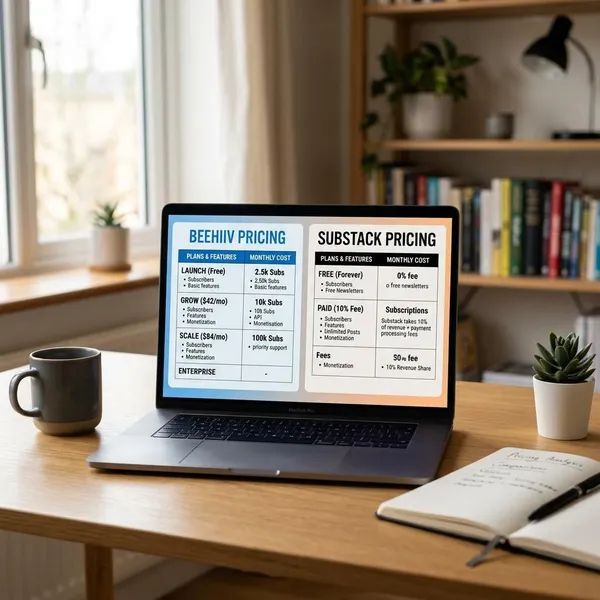
Substack is a simple way to publish a newsletter, build an email list, and charge readers without setting up separate tools for blogging, email delivery, and memberships. The substack newsletter platform works best when you have a clear topic, can publish regularly, and want a direct relationship with readers rather than relying only on social media traffic.

How does Substack work?
Substack gives each creator a publication page. When you publish a post, it can appear on the web and land in subscriber inboxes at the same time. Readers can follow for free, pay for premium access if you offer it, or discover public posts through links, search, Notes, and recommendations from other publications.
- Set up the publication: choose the name, URL, description, branding, and basic reader promise.
- Publish free posts first: use them to show your voice, topic, and consistency.
- Build discovery loops: share posts, use Notes, and earn recommendations from related writers.
- Add paid access when it makes sense: charge for depth, frequency, access, or a sharper point of view.
Create a publication
Creating a publication is mostly about positioning, not technology. Substack handles the page, email delivery, basic design, and subscriber tools, so your first real decision is what readers are signing up for.
Publish posts to subscribers
Each post can be sent by email and saved to your public Substack archive. That dual format matters because loyal readers may open every issue in their inbox, while new readers may find one useful post months later and subscribe from there.
You can publish text, images, audio, embedded media, and video depending on your format. A writer might send essays, a consultant might publish practical breakdowns, and a podcaster might pair each episode with a short summary and useful links.
Grow through the Substack network
Substack is not only an email tool; it has internal discovery features. Notes gives you a short-form feed for quick ideas and links, while Recommendations lets other creators point their readers toward your publication.
This helps most when your topic overlaps with an existing reader community. A niche climate newsletter recommended by another climate writer is more likely to attract useful subscribers than a random viral post. The mistake is assuming the network will grow the publication for you. It can help, but it does not replace a clear topic and reliable publishing.
Add paid subscriptions
Paid subscriptions let you charge monthly or yearly for member-only content. The strongest paid offers usually give readers one of three things: better decisions, saved time, or access they cannot easily get elsewhere.
- Good paid fit: recurring analysis, specialist research, premium tutorials, private podcasts, or member Q&A.
- Weak paid fit: occasional personal updates with no clear reader benefit.
- Safer starting point: keep some posts free so new readers can judge the value before paying.

Key Substack features
The useful part of Substack is not one single feature. It is the way publishing, email, payments, discovery, and subscriber control sit in the same workflow. That is why it appeals to solo creators who would rather spend their time writing, recording, or analyzing than connecting five different tools.
Email and web publishing
Email and web publishing happen together on Substack. You write once, then the post can reach existing subscribers by email and remain available as a shareable web page.
Notes and Recommendations
Notes works like a lightweight social feed inside Substack. It is useful for staying visible between full posts, sharing quick reactions, and joining conversations around your topic.
Recommendations are more direct. If a trusted creator recommends your publication, some of their readers may subscribe because the endorsement already carries context. This is especially helpful for small newsletters that do not yet have much search traffic or a large social following.
Paid subscriptions
Substack's paid subscription tools are built into the publication. You can decide which posts are free, which are partly paywalled, and which are only for paying readers.
A mixed model is often the most sensible starting point. Free posts show quality and attract new subscribers; paid posts give loyal readers a reason to support the work. A hard paywall can work for high-value analysis, but it is harder if readers have not seen enough of your thinking yet.
Podcasts and video
Substack can also support podcasts and video, which makes it useful for creators who do not want to publish only written posts. A podcaster can send episodes to subscribers, add show notes, and offer bonus audio to paid members.
Subscriber list export
Subscriber list export is one of Substack's most important practical features. It means you can export your subscriber data instead of being fully locked into the platform.

Substack pricing and fees
Substack is free to use for free publications. You pay the platform when you earn money from paid subscriptions, because Substack takes a percentage of paid revenue. Stripe payment processing fees also apply when readers pay.
This model is beginner-friendly because you can test a publication without a monthly software bill. The trade-off appears later: if your paid newsletter becomes large, a percentage fee can cost more than some fixed-price email or membership tools.
| Cost point | What it means for creators |
|---|---|
| Free publication | No monthly platform fee just to publish and collect free subscribers. |
| 10% Substack fee | Applies to paid subscription revenue, so the cost grows as revenue grows. |
| Stripe processing | Separate payment fees for card handling, billing, and checkout infrastructure. |
| Your subscription price | You choose the monthly and yearly price, but readers need a clear reason to pay. |
Free to publish
You can start a free Substack publication without paying for hosting, email software, or a separate website. That makes it a low-risk option for testing whether people actually want your topic.
For a hobby writer or early-stage expert, this is usually the right first move. Publish consistently, watch which posts earn replies and subscriptions, and only think about monetization once the reader demand is visible.
10% fee on paid subscriptions
Substack takes a 10% fee from paid subscription revenue. For a small publication, that can be easier to accept than paying for software before earning anything.
For a larger paid newsletter, the calculation changes. If the publication earns meaningful monthly revenue, compare the fee against what you receive from Substack: simple publishing, payment handling, discovery tools, and less technical maintenance. The platform is not automatically the cheapest option at scale.
Stripe processing fees
Stripe processing fees are separate from Substack's fee. They cover payment processing, recurring billing, checkout, and related transaction infrastructure.
The practical check is net revenue, not headline price. If you charge a low monthly amount, fees can take a more noticeable share of each payment. If you sell annual plans or higher-value subscriptions, the fee impact may feel different.
Creator-set subscription prices
Substack lets creators choose their own monthly and yearly prices. Pricing should match the value readers receive, not just what other newsletters charge.
- Lower prices can reduce friction for broad, personal, or early-stage newsletters.
- Higher prices need stronger utility, such as specialist analysis, business value, or direct access.
- Annual plans can improve commitment, but only if readers trust the publication will continue.

Who should use Substack?
Substack is best for creators who can build trust around a specific voice, topic, or expertise. It is less ideal for projects that need advanced website design, complex ecommerce, large editorial teams, or heavy automation.
Independent writers
Independent writers are a natural fit because Substack removes much of the setup work. Essays, criticism, commentary, personal writing, and serialized ideas can all live in one place with a direct subscriber list.
This is especially useful for writers with limited time. If you only have a few hours a week, a simple workflow may matter more than full design control.
Journalists and analysts
Journalists and analysts can use Substack well when readers value regular interpretation, not just raw news. A strong publication might explain politics, markets, technology, media, or local issues with a viewpoint readers trust.
Paid subscriptions make the most sense when the work helps readers understand something faster or make better decisions. If the content is mostly reposted public information, it will be harder to justify a paid offer.
Niche experts
Niche experts can turn specialized knowledge into a focused newsletter. This can work for consultants, teachers, coaches, hobby specialists, and professionals who answer the same kinds of questions repeatedly.
A narrow topic is often an advantage. "Weekly advice for first-time vegetable gardeners in small spaces" is easier for the right reader to understand than a broad lifestyle newsletter. Specificity helps both free growth and paid conversion.
Podcast and video creators
Podcast and video creators can use Substack as a home base around their media. Instead of only sending people to open podcast apps or video platforms, they can collect subscribers, add written context, and offer member-only extras.
This works best when the email adds value. Episode summaries, links, transcripts, bonus clips, or follow-up notes give readers and listeners a reason to stay connected beyond the main feed.
Paid newsletter creators
Paid newsletter creators should consider Substack when they want to launch quickly and avoid building a custom membership system. The platform is designed for recurring reader support, so the basic paid setup is straightforward.
Conclusion
Substack is a practical choice if you want to publish regularly, grow an email audience, and possibly charge readers without building a full tech stack. Start with a clear reader promise and free posts that prove the value; paid subscriptions should come after people understand why your work is worth returning to. If you need deep customization or complex business features, compare alternatives before committing too heavily.