If you are comparing an image stabilization camera, the key question is simple: will it help with the kind of blur or shake you actually get? Stabilization is useful for handheld photos, low-light scenes, longer lenses, and casual video, but it does not freeze a moving subject or replace every tripod use.
What does image stabilization do in a camera?
Image stabilization reduces the effect of small camera movements while you shoot. The first thing to check is whether your problem is hand shake or subject movement. Stabilization helps with the first one; shutter speed helps with the second.
Reduces blur from camera shake
Stabilization is most useful when the camera moves during the exposure. That can happen from breathing, pressing the shutter, holding a heavy lens, or trying to shoot one-handed while travelling.
It works best on subjects that are still or nearly still: a building at dusk, food in a dim restaurant, a museum display, or someone posing near a window. If a child runs across the frame, the camera may be stable, but the child can still blur because the subject is moving.
Helps at slower shutter speeds
Slower shutter speeds let in more light, and stabilization can make those slower speeds more usable by hand. That can help you avoid very high ISO or harsh flash in indoor scenes.
The safe limit is not fixed. It depends on your camera, lens, focal length, posture, and how steady you are. A sensible habit is to take a quick test shot, zoom in to check fine detail, and raise the shutter speed if faces, text, or edges still look soft.
Smooths handheld video
For video, stabilization is less about perfect sharpness and more about watchability. It reduces little jitters that make handheld footage feel nervous, especially in casual clips shot on a phone, mirrorless camera, or compact camera.
- Standing still and filming: in-camera stabilization is often enough.
- Panning slowly: stabilization helps if your movement is controlled.
- Walking or climbing stairs: expect some bounce unless you add a gimbal or use very careful technique.
Improves stability at longer focal lengths
The longer the lens, the more obvious camera shake becomes. A tiny hand movement that barely shows at a wide angle can make a distant subject jump around at 200mm or 300mm.
How does camera image stabilization work?
Camera image stabilization starts by detecting movement, then correcting it in the opposite direction. The correction can happen in the lens, at the sensor, through software, or by stabilizing the whole camera with an external device.
The important detail is that these systems are not doing the same job in the same way. Optical and sensor-based stabilization physically compensate for movement while the image is being captured. Electronic stabilization works after or during capture by adjusting the video frame digitally.
Motion sensors detect camera movement
Small motion sensors, often gyroscopic sensors, measure how the camera is shifting. The camera or lens processor uses that data to decide how much correction is needed.
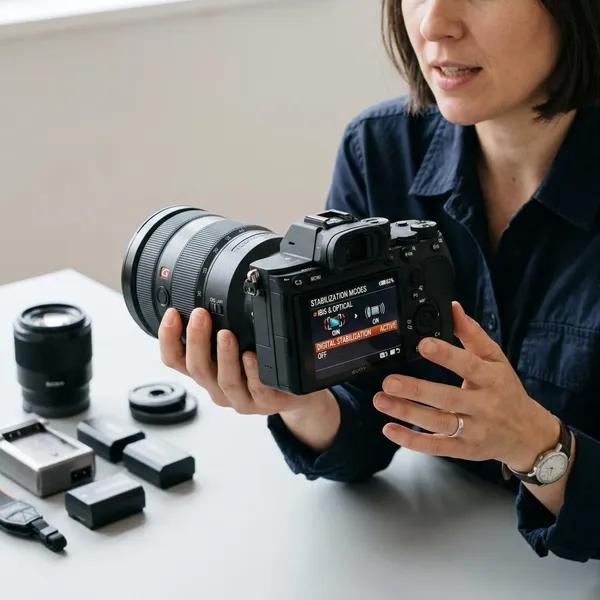
You usually do not see this happening. You turn stabilization on in the camera menu or on the lens, and the system works in the background. On many cameras, the live view also becomes steadier, which makes composing a shot easier before you press the shutter.
Lens elements can move to counter shake
In OIS systems, selected lens elements move inside the lens to keep the projected image steadier. This is especially useful in telephoto lenses because the correction can be designed around that exact optical layout.
If you often shoot distant subjects, a stabilized lens can feel like a real quality-of-life upgrade. It does not only improve final sharpness; it also helps you keep the subject in the frame.
The image sensor can shift to compensate
In IBIS systems, the camera moves the sensor itself. That means stabilization is built into the camera body rather than depending only on the lens.
The big advantage is flexibility. If you use several lenses, including older primes or lenses without built-in stabilization, IBIS can still help. For a hybrid shooter who takes photos one day and handheld clips the next, this is often the most practical built-in option to prioritize.
Software can crop and correct video movement
EIS uses software to smooth video by cropping slightly into the frame and repositioning the image as movement changes. It is common in phones, action cameras, and compact video devices because it does not require large moving parts.
The trade-off is worth checking before you rely on it. EIS can narrow your field of view, and aggressive correction may look strange in low light, fast motion, or scenes with a lot of rolling shutter. For quick travel clips or social media videos, though, it is often convenient and good enough.
Types of camera image stabilization
The best type depends on what you shoot most. Someone taking handheld family photos indoors has different needs from someone filming walking tours or photographing birds with a long lens.
| Stabilization type | Best fit | Main trade-off |
|---|---|---|
| IBIS | Mixed photo and video with different lenses | Performance varies by camera body |
| OIS | Zoom and telephoto shooting | Only helps through supported lenses |
| EIS | Simple handheld video on phones or small cameras | Often crops the image |
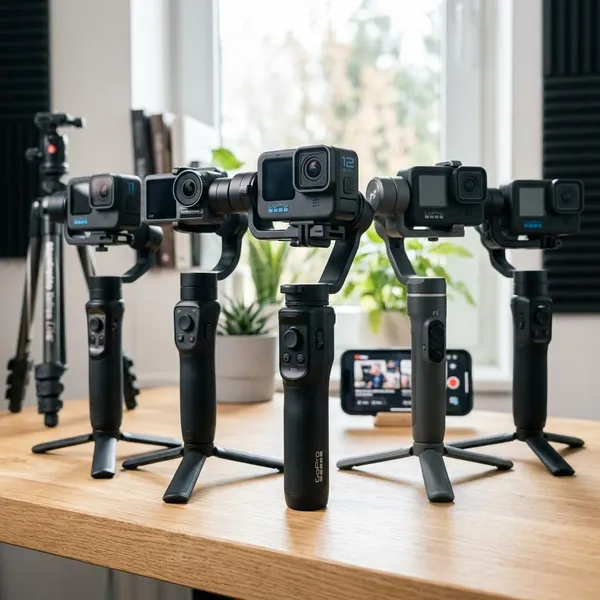
| Gimbal | Smooth moving video shots | Extra gear, setup, and battery charging |
How to choose the right stabilization setup
Start with your main problem, not the most impressive spec sheet. Are your photos soft because your hands move, are your videos shaky because you walk while filming, or are you struggling to frame distant subjects with a long lens?
Choose IBIS for photo and video flexibility
Choose IBIS if you want a camera that stays useful across different lenses and shooting styles. It is the safest all-round choice for someone who takes portraits, travel photos, indoor shots, and occasional video with the same body.
It is also helpful if you plan to buy non-stabilized lenses later. Instead of paying for stabilization in every lens, you get a stabilizing system that can support much of your kit from the camera body.
Choose OIS when lens stabilization matters
OIS should move up your priority list when you use longer focal lengths. A stabilized telephoto or travel zoom can make handheld shooting feel much more controlled.
Choose EIS for simple handheld video
EIS is the practical pick when you want to record quickly without extra gear. It suits casual creators, travellers, parents, and anyone who values a small setup over perfect motion.
Before depending on it for an important shoot, test it in the same kind of light and movement you expect to use. A clip that looks good outdoors while standing still may look less natural indoors while walking.
Add a gimbal for more controlled movement
Add a gimbal when smooth movement is part of the shot, not just a nice bonus. In-camera stabilization can reduce shake, but it usually cannot create the same controlled floating motion when you walk, turn, or follow a subject.
For occasional travel, a gimbal may be more hassle than it is worth. For regular video work, real estate clips, event coverage, or planned social content, it can be a better upgrade than chasing a slightly stronger in-body stabilization rating.
Conclusion
The right stabilization setup is the one that matches your weakest shooting situation. Choose IBIS for flexible everyday photo and video use, OIS for long lenses, EIS for quick handheld clips, and a gimbal when controlled movement matters more than convenience. Stabilization is a big help, but the smartest results still come from pairing it with the right shutter speed, lens choice, and shooting style.